Technical Setup Before You Start
How To Setup Meta Business Suite
You don’t need to setup a new account with a new email address. Log into business.facebook.com with whatever Facebook user account you use to manage the Facebook Page you want attached to your new episode ad.
Setup your Meta Business Suite Account Here
Meta Business Suite is a one-stop shop where you can manage all of your marketing and advertising activities on Facebook and Instagram. It centralizes tools that help you connect with your customers on all apps and get better business results.
Whether you’re using it on desktop or mobile, Meta Business Suite makes it easy to view notifications and respond to messages quickly. You can also create or schedule posts, stories and ads for your business, and you’ll find helpful insights to optimize your efforts as you go.
How To Setup Meta Ad Manager
You will access your Ad Manager THROUGH your Meta Business Suite, but it still has some setup processes like adding your credit card.
Ads Manager is your starting point for running ads on Facebook, Instagram, Messenger or Audience Network. It’s an all-in-one tool for creating ads, managing when and where they’ll run, and tracking how well your campaigns are performing towards your marketing goals.
With the Ads Manager app for iOS and Android, you can keep an eye on your campaign while you’re on the go. Wherever you are, you’ll have the power to create and edit ads, track their performance, and manage ad budgets and schedules.
How To Link Your Facebook Page and Instagram Account
You’ll want to make sure your Facebook Page and Instagram accounts are linked, and in your business manager so your ad can reach both platforms seamlessly.
Add an Instagram account to your Meta Business Manager, Here
How to connect or disconnect an Instagram account from your Page, Here
How To Setup Facebook Pixel on Your Website
If you want to eventually target your website visitors on Facebook or reach more people on Facebook that LOOK like your website visitors, you’ll want to setup a Meta Pixel on your website. You don’t have to do this for your first ad, but it will likely be helpful to you over time.
The Meta Pixel is a piece of code that you put on your website that allows you to measure the effectiveness of your advertising by understanding the actions people take on your website.
You can use the Meta Pixel to:
-
Make sure your ads are shown to the right people. Find new customers, or people who have visited a specific page or taken a desired action on your website.
-
Drive more sales. Set up automatic bidding to reach people who are more likely to take an action you care about, like making a purchase.
-
Measure the results of your ads. Better understand the impact of your ads by measuring what happens when people see them.
Your Ad Checklist
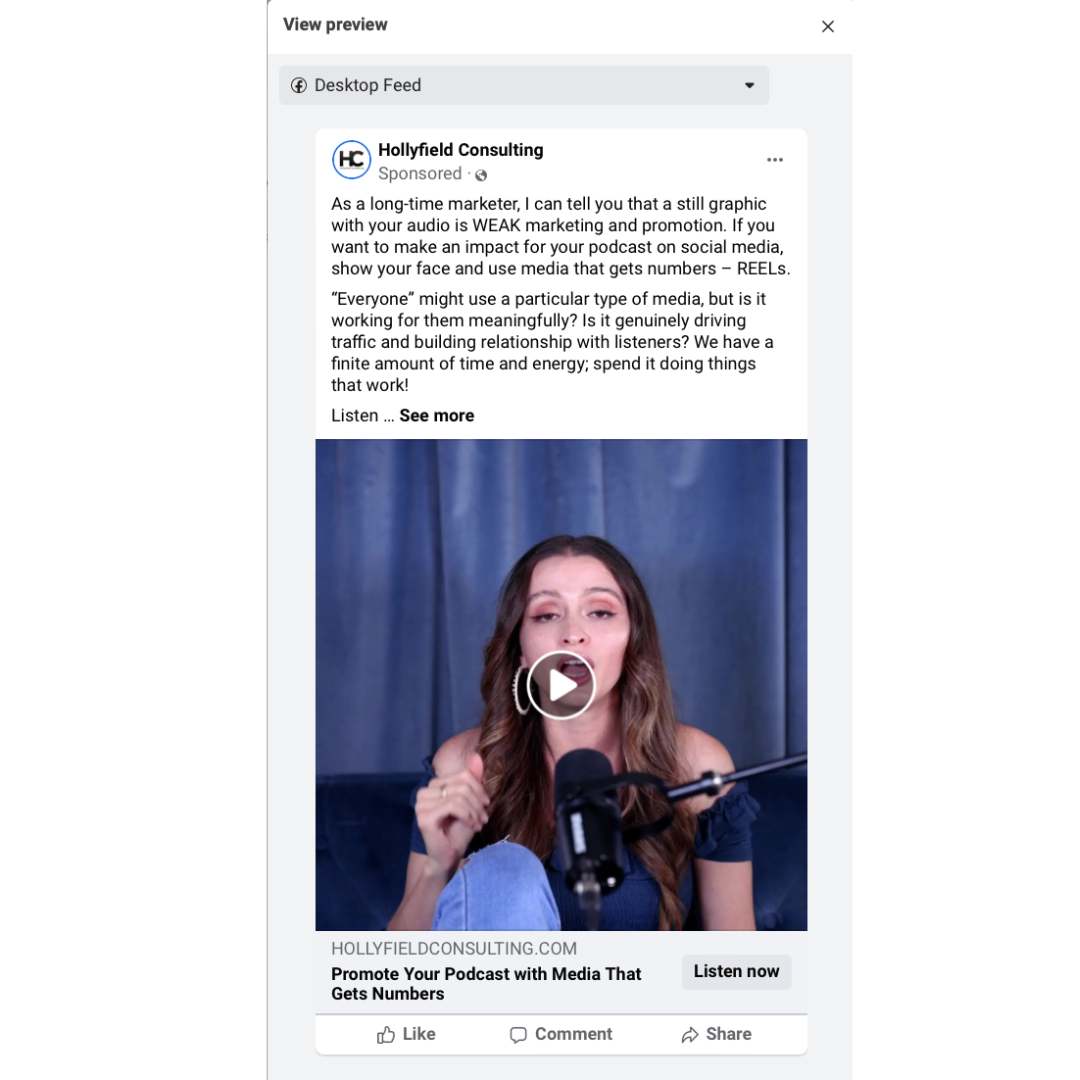
Your Ad Should Look Something Like This
Sorry about my face; it’s just how it is. You’ll get the full ad preview in the crash course, but I want you to see how the checklist applies to what the ad actually looks like.
Struggling With Your Podcast Audio or Video Setup?
Book a one-hour technical call with a seasoned podcast producer, editor, and someone that has setup home, network, and travel studios.
In this one-on-one session, you’ll learn how to optimize your mic, camera, lighting, and recording workflow for professional results from home.
For professional studio services, please book a Discovery Call for a custom proposal.
$175.00Book Your Call